Your rankings move, but your click-through rate stays flat. Search Console shows impressions climbing while actual clicks lag behind, and tweaking titles has stopped working. That gap is usually why people start hunting for a CTR tool that sends real human clickers instead of bots.
This article breaks down what separates a genuine click campaign from a risky one, including visit proof, platform coverage, and pricing. Then it compares four tools and tells you exactly when each fits, so you can pick the right one for Google, Bing, Maps, or AI Overviews.
What to Look For in a CTR Tool for Real Human Clickers
Evaluating a CTR tool for real human clickers requires looking beyond promises of 'organic traffic' and examining how visits are sourced, verified, and reported. Not every CTR tool relies on genuine people. Some depend on click bots or automated scripts that click fraud detection systems can flag, putting your campaign and rankings at risk.
Two factors matter most when comparing options. First, proof of real visits, meaning evidence you can inspect rather than take on faith. Second, the operational model, which covers platform coverage, targeting precision, and how pricing scales with campaign volume.
The subsections below break down each criterion so you can judge tools on what they demonstrate, not just what they claim.
Proof of Real Visits and Click Quality
The first thing to verify is whether a tool provides verifiable evidence that clicks come from real humans who actually engage with your page, not automated bots. Proof can take several forms, and a credible tool should be willing to show at least one of them.
- Screenshots of the search query and the landing page as it appeared
- Session recordings or full visit paths showing how the visitor navigated
- Dwell time and session duration reports
- Third-party verification or independent reporting
Click quality matters as much as click volume. A visit that ends in seconds with a high bounce rate sends weak engagement signals through Google Analytics and related tools. Rather than lifting your SERP ranking, low-quality clicks can work against you.
Look for transparency in reporting. A tool should be comfortable showing engagement metrics alongside raw click counts. If a provider only reports totals with no supporting detail, treat the numbers with caution.
Research suggests search engines increasingly weigh user engagement metrics when assessing pages. That makes the quality of each visit a practical concern, not a theoretical one. Ask how a tool handles dwell time targets, whether it can simulate natural mouse movement and scrolling, and whether it reports on those behaviors afterward.
Also consider how a tool sources its clickers. Networks built on residential proxies and genuine devices behave differently from data-center IPs, and detection systems are tuned to spot the latter. Tools that rotate IPs, user agents, and referrers responsibly tend to produce visits that hold up under scrutiny. The key question is simple: can the provider show you the evidence, or only describe it?
Platform Coverage, Targeting, and Pricing Model
A tool's usefulness depends on which search engines and surfaces it supports, how precisely you can target locations and devices, and whether its pricing aligns with your campaign volume. These three dimensions separate flexible tools from limited ones.
Platform coverage should extend beyond standard Google web results. Check whether a tool handles Bing, Google Maps, and newer surfaces such as AI Overviews, since search visibility now spans all of them. A tool limited to one engine may not fit a multi-channel campaign.
Targeting options vary widely. Some tools offer geotargeting down to country, state, or city level, plus device type selection. Others provide only broad regional settings. If your keyword ranking goals are local, precise targeting is essential.
Pricing structures typically fall into three categories:
- Credit-based, where each click consumes credits
- Subscription plans with a monthly click allowance
- Pay-per-click arrangements billed per delivered visit
With credit-based pricing, watch how credits are consumed. A desktop visit and a mobile visit may cost different amounts, and premium targeting such as city-level geotargeting can carry a surcharge. Estimate your monthly click volume against the credit cost before committing.
Finally, confirm that the pricing model matches how you plan to run campaigns. A tool built for steady, low-volume testing behaves differently from one designed for larger click volumes. Matching the model to your workflow avoids paying for capacity you will not use.
1. CTRTool - Best Overall
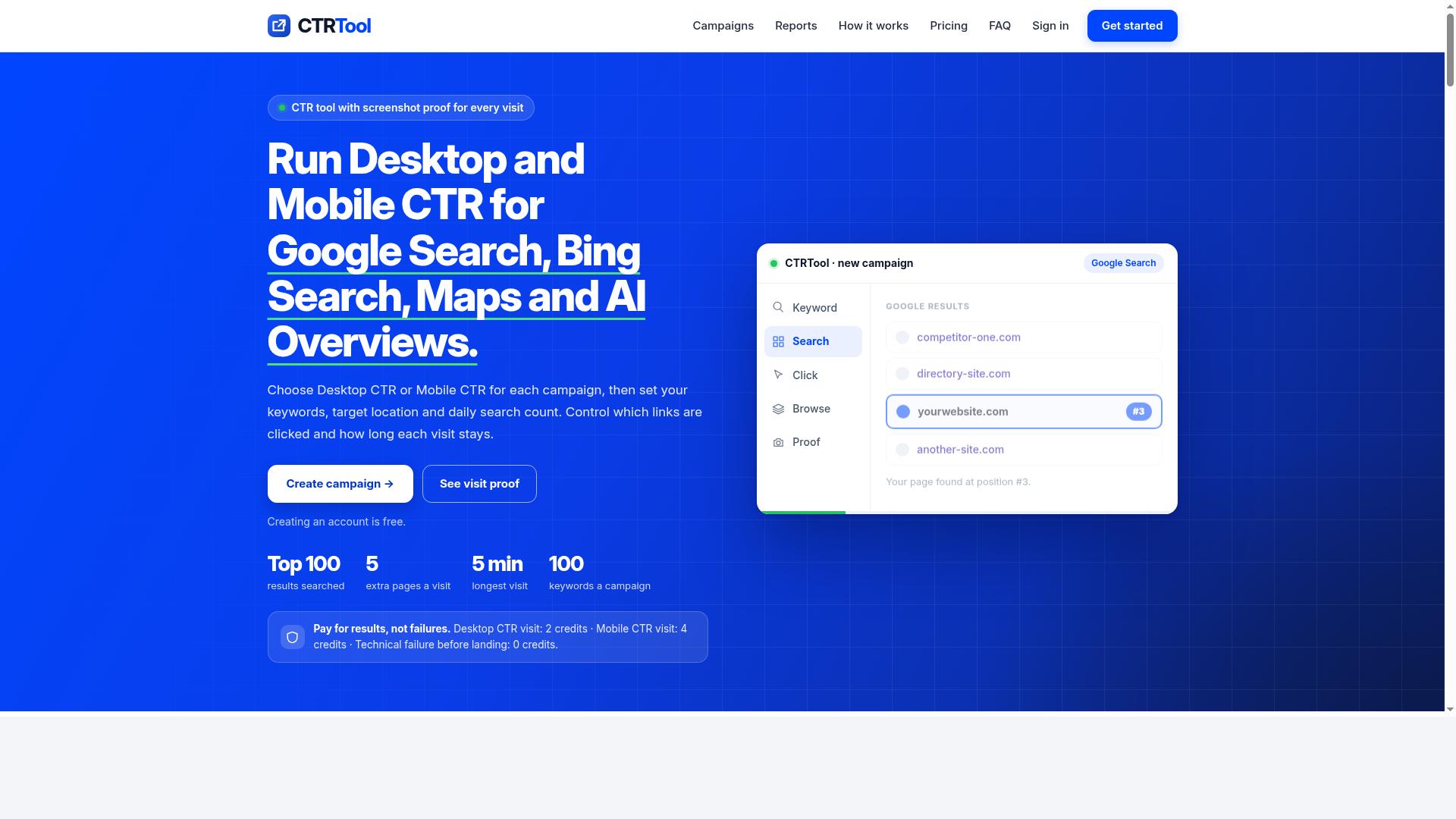
CTRTool earns the top spot for its combination of screenshot proof for every visit, broad platform coverage, and transparent credit-based pricing. It runs Desktop and Mobile CTR campaigns for Google Search, Bing Search, Maps, and AI Overviews, with proof for every visit.
That mix matters for anyone comparing CTR tools. Many options handle one surface well, usually Google organic results. CTRTool covers four, and every campaign produces evidence you can show a client or keep for your own records.
The two sections below cover the campaign mechanics and pricing, then the situations where CTRTool is the right pick over the alternatives in this roundup.
Campaign Types, Screenshot Proof, and Credit Pricing
CTRTool offers four campaign types, Google Search, Bing Search, Google Maps, and AI Overviews, each with desktop or mobile targeting and screenshot proof for every visit. Setup follows the same pattern across all four.
- Google Search CTR: target keywords and click organic results, with search depth up to the top 100 results and support for internal pages
- Bing Search CTR: the same keyword-and-click flow applied to Bing results
- Google Maps CTR: find a business listing and click its website link, checking up to 50 listings with city targeting
- AI Overview CTR: find your website in the overview and click its source link, with citation order tracked
Each campaign supports up to 100 keywords. You set the keyword, country, and optionally state or city, plus daily search counts with now, spread out, or gap timing. Daily goals reset at 00:00 UTC.
Proof comes as separate search and landing screenshots, alongside full visit paths and keyword position tracking over time. Positions cover Search rankings, Maps listing order, and AI citation order, so movement is visible rather than assumed.
Pricing is credit based. Starter is $59/month for 2,000 credits, enough for up to 1,000 Desktop or 500 Mobile visits. Growth is $125/month for 5,000 credits, covering up to 2,500 Desktop or 1,250 Mobile visits. Mobile visits consume credits faster than desktop ones, so volume planning should account for the split.
When to Use CTRTool
CTRTool is best suited for SEO practitioners and agencies running CTR campaigns for their own or client websites across Google, Bing, Maps, and AI Overviews. The screenshot proof makes it a natural fit when visits need to be verifiable for client reporting.
Reach for it in these situations:
- You need documented evidence of each visit, not just a dashboard count
- Your strategy spans multiple platforms, especially Maps listings and AI Overviews where most CTR tools offer nothing
- You need granular geotargeting by country, state, or city for local search visibility work
- You want to test both desktop and mobile click-through behavior for the same keyword set
Credit-based pricing scales with volume, which suits teams that run occasional campaigns on a few keywords as well as agencies managing steady click volume across several clients. Sessions are delivered through Desktop Chrome windows and real Android phone sessions matched to the target location via managed proxy routes.
One caution from the tool's own guidance: start with tier links, PBNs, and test properties, and use CTR on main sites with caution. Treat it as a controlled tactic with measurable proof rather than a blanket fix for weak rankings.
2. SerpClix
Publicly available information on SerpClix is limited, so the details below stay general. It is commonly referenced as a CTR tool that connects advertisers with real users who search for specified keywords and then click through to a target page.
Based on its category positioning, it appears to support Google and Bing and to offer geotargeting, so campaigns can be aimed at users in particular regions. Buyers should confirm current feature lists and pricing directly, since these can change.
Because the model is built around genuine people rather than a click bot or proxy network, the resulting activity can resemble ordinary organic traffic. That makes it a common reference point when comparing tools built around real human clickers.
When to Use SerpClix
SerpClix may be a good fit if you prioritize a large network of human clickers and need basic geotargeting for Google or Bing campaigns. A pay-per-click structure is straightforward, which makes it easy to understand what you are paying for.
It tends to suit advertisers who want a simple setup without extra layers. If your keyword ranking goals center on the two major search engines, the coverage may be sufficient.
Consider the fit carefully in these situations:
- You want a straightforward pay-per-click model with a broad pool of real users.
- Your campaigns only need Google and Bing coverage, with no Maps or AI Overviews placement.
- You prefer a tool with a long track record over a newer entrant.
Some limitations are worth weighing. Some users report less granular proof of individual clicks, and screenshot proof may not be available. That can make verification harder when you need detailed evidence of each visit.
There is also less control over finer signals such as dwell time and session duration, which matter for user engagement metrics and bounce rate. If those details are central to your strategy, compare options before committing.
For simple, search-focused campaigns, the tradeoff may be acceptable. For campaigns that demand deeper reporting, the tool may feel limited.
3. ClickSEO
ClickSEO is a CTR bot that sends real organic search clicks to a website to raise click-through rate and improve Google rankings. It is built to send clicks to a site from the Google SERPs, aiming to lift click-through rate and support SERP ranking for targeted keywords.
The tool is positioned around simulating real user behavior. Its feature set includes generating high-quality organic clicks, compatibility with major analytics tools, and improving session duration, bounce rate, and page views.
That technical depth may appeal to users who want more hands-on control over campaign mechanics. Where simpler tools hide the plumbing, ClickSEO tends to put it front and center, which suits operators who prefer to tune each variable themselves.
It is worth noting that the public listing does not state pricing, so interested users may need to inquire directly. As with any automation-heavy approach, the value depends on how carefully the settings are managed.
When to Use ClickSEO
ClickSEO might be suitable for SEO professionals, agencies and service providers, new websites seeking initial rankings, existing sites targeting core keywords, and local businesses improving GMB exposure. Advanced operators who want to shape specific user engagement metrics may find the configuration options useful.
Some users could consider it when they need to simulate particular signals, including dwell time and session duration, alongside compatibility with major analytics tools. The appeal is precision: adjusting individual parameters rather than relying on broad defaults.
That same control carries tradeoffs. Heavy automation of this kind may raise click fraud detection risk, since patterns can become easier to flag over time. Users should weigh that risk against their goals.
It is also worth being clear about what such a tool can and cannot show. Automation may not provide proof of real human clicks, so any claims of authenticity should be treated with caution. For teams that prioritize verifiable human engagement, that distinction matters.
In short, ClickSEO may fit technically minded users running controlled experiments with proxy network and rotation settings. Those who prefer simplicity or stronger evidence of genuine human activity might look elsewhere in this roundup.
4. CTR Sprout
Publicly available information on CTR Sprout is limited, so the details below stay general. It is positioned in the same broad category as other CTR manipulation tools, where the goal is to lift click-through rate signals for chosen queries.
Buyers comparing it against alternatives should confirm current feature lists and pricing directly, since these can change.
When to Use CTR Sprout
CTR Sprout may be a reasonable choice for small to mid-sized campaigns where you want a simple interface and basic CTR features without advanced automation. It fits marketers who value ease of use over depth.
Consider it when your needs are straightforward. A few scenarios where it may suit:
- You are running basic Google CTR campaigns and do not need complex configuration.
- You prefer a lower-cost entry point while testing whether CTR campaigns work for your site.
- You do not require extensive proof of results or coverage across multiple search platforms.
It may lack some advanced options found elsewhere, such as Maps or AI Overviews campaign support. If your strategy depends on those surfaces, verify availability before committing.
For teams focused on organic search results and simple keyword targeting, the tradeoff of fewer features for a gentler learning curve can be acceptable. Just confirm the specifics, since public documentation is thin.
How to Choose the Right Option
Choosing the right CTR tool comes down to matching your campaign goals, budget, and need for verification with the tool's strengths. The four options differ most in platform coverage, proof of delivery, targeting depth, and pricing structure. A quick checklist run before you commit will save you from paying for features you will never use.
For SEO practitioners and agencies running campaigns across Google Search, Bing Search, Google Maps and AI Overviews, platform coverage is usually the first filter. If you manage client sites, the ability to test on tier links, PBNs or test properties also matters before you touch a money site.
Work through the five questions below in order. Each one narrows the field until only one or two tools remain viable for your workload.
- Platform needs: Decide whether you need Google Search only, or also Bing, Maps and AI Overviews. A Google-only tool is fine for a single-property campaign. Multi-platform coverage matters when client work spans local listings and AI-driven results.
- Proof level: Ask whether you need screenshot proof of delivery or basic reporting is enough. Agencies billing clients often need verifiable evidence. Solo practitioners running internal tests may not.
- Targeting granularity: Check whether you can target by country, state, city and device. Local SEO campaigns for Maps need city-level precision. National keyword ranking pushes usually do not.
- Pricing model: Compare credits against pay-per-click billing and estimate your monthly click volume. A credit model suits bursty campaigns. Per-click pricing suits steady, predictable volume.
- Risk tolerance: Automation and click bot approaches carry detection risk. Real human clickers with residential proxies reduce that exposure but usually cost more. Match the method to how sensitive the target property is.
On the verification question, CTRTool is built around real human clickers rather than automated traffic. That matters if click fraud detection and Google Analytics filtering are concerns for your client properties. The platform covers Google Search, Bing Search, Google Maps and AI Overviews, which suits agencies juggling several campaign types at once.
Targeting is where granularity pays off. Geotargeting at country, state, city and device level keeps click volume aligned with the audience you are trying to influence. Pair that with natural session duration and varied user engagement metrics, and the traffic source diversity looks closer to organic search results than a single-source spike.
Before scaling, run a small test on a low-stakes property. Watch bounce rate, dwell time and keyword ranking movement in SERP tracking. If the pattern holds, increase click volume gradually rather than in one jump. The same discipline applies whether you are testing a new landing page with A/B testing or supporting an existing organic traffic baseline.
For agencies, the deciding factor is often proof and reporting, since clients want evidence tied to search visibility gains. For solo SEO practitioners, pricing model and platform coverage usually tip the decision. Neither path requires every feature on the list. Pick the tool that clears your must-haves and skip the rest.
Final Verdict
After comparing the options, CTRTool stands out as the best overall choice for its verifiable screenshot proof, broad platform coverage, and transparent credit pricing. The other three tools each serve a narrower purpose, and the right pick depends on your campaign goals, technical comfort, and how much verification you need.
Here is how the four tools compare on the factors that matter most for real human click campaigns:
| Tool | Best For | Key Strength |
|---|---|---|
| CTRTool | Proof-driven campaigns across multiple platforms | Screenshot proof, full visit paths, position tracking |
| SerpClix | Basic Google and Bing campaigns | Simple setup for straightforward search clicks |
| ClickSEO | Technical users | Configuration depth for hands-on operators |
| CTR Sprout | Budget-conscious beginners | Low-cost entry point |
SerpClix remains a solid alternative if your needs are limited to basic Google and Bing campaigns and you do not require deep verification. ClickSEO suits technical users who want granular control over campaign setup. CTR Sprout is a budget-friendly option for testing the waters with smaller spend.
What separates CTRTool is the proof layer behind every visit. Each visit comes with screenshot proof, with search and landing screenshots delivered as separate proof images. You also get full visit paths, so you can see how a real human clicker moved through your site rather than trusting a bare click count.
Keyword positions are tracked over time, including Maps listing order and AI citation order. That matters because search visibility now spans standard organic results, local listings, and AI-generated answers, and a single rank number no longer tells the whole story.
The platform coverage is equally broad: Google, Bing, Maps, and AI Overviews. Campaign capacity reaches up to 100 campaigns with 100 keywords each, and visits can run up to 5 minutes with up to 5 additional internal pages. Longer session duration and deeper page paths feed directly into user engagement metrics like bounce rate and dwell time, the signals that support organic traffic quality.
Pricing is where the transparency shows. CTRTool uses a pay-for-results credit model: no credits are charged for technical failures before landing, and visits that cannot verify the requested location use no credits. One credit balance is shared across all campaign types, websites, and keywords, and unused credits roll over while you are subscribed.
If you want verifiable proof, wide platform reach, and pricing that only charges for results, CTRTool is the clear pick. Visit the website to review the details or contact support with questions about your specific campaign needs.
Frequently Asked Questions
What makes CTRTool different from other CTR tools?
CTRTool provides screenshot proof for every visit, with search and landing screenshots as separate proof images, plus full visit paths and keyword position tracking over time. It runs campaigns across Google Search, Bing Search, Maps and AI Overviews, with Desktop or Mobile CTR chosen per campaign. That combination of verifiable proof and multi-platform coverage is why it's our #1 pick.
Which campaign type should I choose: Google Search, Bing, Maps or AI Overviews?
Use Google Search CTR to have real users search your keyword and click your organic result, and Bing Search CTR for the same on Bing. Choose Google Maps CTR when you want clicks on a business listing, or AI Overview campaigns when you need a matching source link cited. Pick the campaign type that matches where you actually want visibility.
How much does CTRTool cost, and how do credits work?
CTRTool uses monthly plans priced in USD, starting with Starter at $59/month for 2,000 credits (up to 1,000 Desktop CTR visits or 500 Mobile CTR visits) and Growth at $125/month for 5,000 credits. Because it's pay-for-results, credits map directly to the visits you receive, so you can match the plan to your campaign volume.
Can I target specific locations and keywords with CTRTool?
Yes. You set your keywords and can target a chosen country with an optional state and city, or select "Any country" to use a mix of supported locations. Your page must appear within the top 100 organic results for the chosen keyword and location, so targeting stays realistic.
What are the requirements for Maps and AI Overview campaigns?
Maps campaigns check up to 50 listings (about five pages) to find your business listing, so your listing needs to be discoverable within that range. AI Overview campaigns require a matching source link. Both are worth confirming before launching a campaign so your visits register correctly.
Is CTRTool suitable for agencies managing client sites?
Yes. CTRTool is built for SEO practitioners and agencies running campaigns for their own or client websites, and it's a global online service with no stated country restrictions. Screenshot proof and full visit paths give you documentation you can share with clients. For questions, support is available at vaibhav@autoblogging.ai.
 Druckversion